
Digital mall directory: how to replace the static board
OVER Editorial · Updated October 25, 2026 · Blog
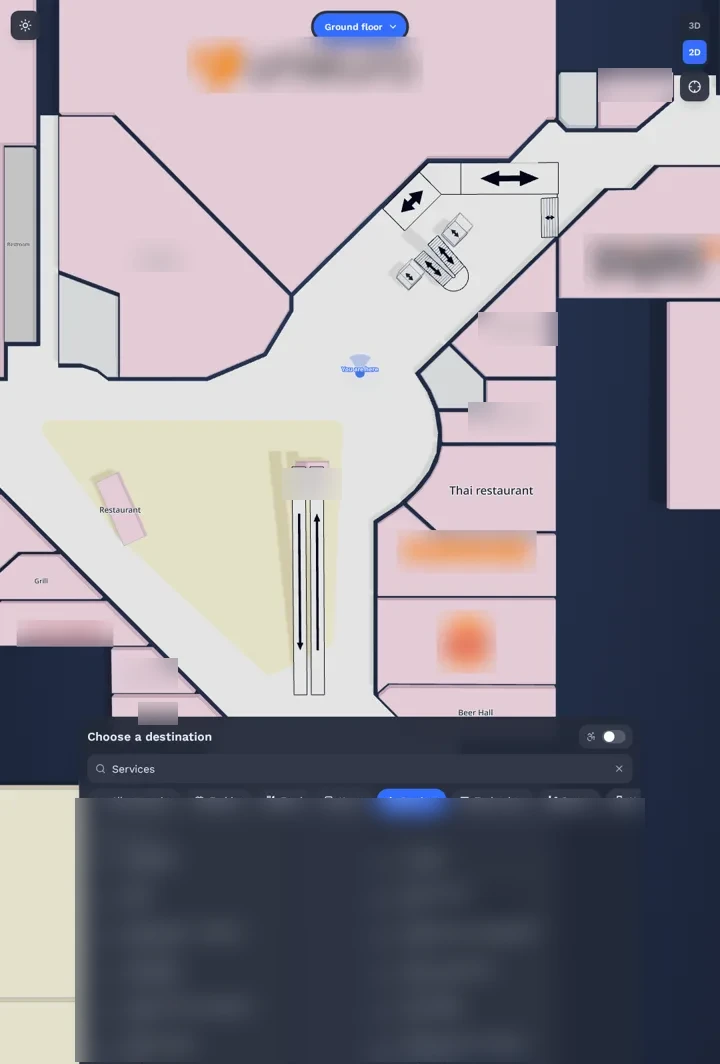
A digital mall directory replaces the printed board at your entrances with a searchable map that also lives on your website and on shoppers' phones. This guide is for property, marketing and operations managers of shopping centers who are planning that switch, or who already have kiosks and want them to do more.
A printed board is accurate on the day it is installed. After that, every store opening, closing or relocation makes it a little more wrong, and the gap grows with multiple floors, entrances and parking levels.
This practical guide covers what a digital directory is, how kiosks, website and phones share one map, how to roll it out step by step, what to measure after launch and where the approach has limits.
Key takeaways:
- A directory is only as good as its map data and the person who updates it.
- Kiosks, website and phones should read from one map, not three.
- Phone directions can run in the browser, with no app and no beacons.
- Plan for tenant churn before launch, not after.
- Measure failed searches first: they show what your map is missing.
What is a digital mall directory?
A digital mall directory is a searchable, interactive mall map that replaces the printed board at the entrance. Shoppers search for a store, a restroom or the parking garage, and the directory draws the route. Good ones run on in-mall kiosks, on the mall website and on shoppers' phones, all fed by the same map data.
In practice, a complete directory has three layers:
- The map. Floors, corridors, units, escalators, elevators, entrances and parking levels.
- The content. Store names, categories, opening hours, services and promotions.
- The channels. Kiosks on site, the interactive map on the website, directions on the phone.
Most of the effort sits in the first two layers: a wrong unit on the map is wrong on every screen.
When a directory falls behind, the signs are usually easy to spot. Shoppers ask the information desk for the same few destinations, new tenants are hard to find, and the website store list no longer matches the floor.
Can a wayfinding kiosk and the mall website use the same map?
Yes, and they should. When the kiosk, the website map and the phone directions read from one map, a store change is edited once and appears everywhere. Separate systems drift apart: the kiosk shows a closed store, the website shows an old layout, and shoppers stop trusting both.
When you evaluate options, ask how a single change travels. A good test case is a store that moves from the ground floor to the first floor:
- Who makes the edit, and in which tool?
- How long until the kiosk, the website and the phone route show it?
- Does the search still find the store under its old name for a few weeks?
Kiosks also work better when they hand off to the phone. A shopper finds a store on the touch screen, scans a QR code, and keeps the route in hand while walking. That frees the kiosk for the next person.
How does mall wayfinding work on a shopper's phone?
The shopper scans a QR code at an entrance or on a kiosk, or taps a link on the mall website. The route opens in the phone browser, with no app to install. The camera recognizes where the shopper stands by matching the view with a 3D map of the mall, then shows directions step by step.
A visual positioning system (VPS) does the matching: it compares the camera view with a 3D map and returns the phone's position. The QR code only opens the web page; the position comes from the camera.
The main alternative is radio positioning with Bluetooth beacons, Wi-Fi or UWB. These systems work and are used in many venues, but they need hardware mounted across the building, with batteries or power and periodic checks. For a side-by-side view, read our guide to indoor positioning without beacons.
Why the browser matters for a mall: most shoppers visit a few times a year. Asking them to download an app for a single visit is a high bar, while a QR code or a link is not.
How to roll out a digital mall directory in 6 steps
- Audit what you have. List every entrance board, kiosk, website map and store list. Note who updates each one today.
- Capture the building. Map every floor, connector and parking level that shoppers use. Ask whether the capture can run during opening hours, so no area has to close.
- Build the destination list. Stores, restaurants, restrooms, ATMs, elevators, exits and parking zones. Use the names shoppers use, plus common misspellings and old names.
- Connect the channels. Kiosks, the website map and phone directions should read from the same source. Test the same route on all three.
- Place QR codes where people stop. Entrances, parking elevators, escalator landings and the food court. Each code opens the navigation in the browser, and the phone camera then locates the shopper.
- Name an owner. One person on the marketing or operations team updates tenants, hours and services. Agree on a turnaround time for every change.
Run a short soft launch before you promote it. Information desk staff will find wrong names faster than any test plan.
How do you measure the success of a digital mall directory?
Track a few numbers every month: failed searches, top destinations, route opens by channel, kiosk-to-phone handoffs and direction questions at the information desk. Failed searches matter most, because each one points to a store, alias or service that shoppers expected to find and your map does not have yet.
What each number tells you:
- Failed searches. Words shoppers typed that returned nothing. Add the missing destination or alias.
- Top destinations. The most searched stores and services, by floor and by time of day.
- Route opens by channel. Kiosk, website and phone, and how many kiosk routes move to a phone.
- Information desk questions. A simple tally of direction requests before and after launch.
- Tenant feedback. Whether new or relocated stores say shoppers find them.
Set a baseline before launch. A tally of desk questions over two normal weeks is enough to compare against later.
What are the limits of a digital mall directory?
A digital mall directory is only as good as its map data and the team that keeps it current. Phone directions need shoppers to allow camera access and hold the phone up briefly. Major renovations call for a new capture, kiosks remain hardware to maintain, and required safety signage stays in place.
Plan for these from the start:
- Some shoppers prefer a 2D map to camera directions. Keep it available.
- A few shoppers will decline camera access in the browser.
- A rebuilt wing or a new floor layout calls for an updated capture.
- A digital directory does not replace required signage such as emergency exits.
- Kiosks need power, cleaning and a plan for when one is off.
Frequently asked questions
How much does a digital mall directory cost?
It depends on a few factors: the floor area and number of floors, how many kiosks you need, whether mapping is included, which channels you want (phone, website, kiosk) and how many centers are covered. Ask vendors for a quote that lists each of these, plus updates and support.
How long does it take to map a shopping mall?
With a 360° camera walkthrough, a large center can be captured in a single visit. At Città Fiera in Udine, Italy, 150,000 m² GLA on multiple floors was captured in about 90 minutes by one operator with an Insta360 X5, during opening hours.
Who updates the directory when a tenant changes?
Your team should be able to edit store names, units and hours without calling the vendor. Ask to see the editing tool during the demo, and ask how changes reach every screen.
How OVER does it
OVER builds the digital mall directory with OVER Wayfinding Suite: one 3D map of your center powers four parts. 3D Venue Mapping is turnkey, done by OVER with one 360° camera. Mobile AR Navigation gives directions in the phone browser, with no app to download.
The Interactive 3D Web Map embeds the same map on your website, and Wayfinding Kiosks show it on your touch screens, where a QR hands the route to the phone. Content is updated once and reaches every screen. Relocalization takes under 100 ms with centimeter-level accuracy, with no beacons or markers.
The suite has been live since June 2026 at Città Fiera in Udine, Italy: 150,000 m² GLA, 230+ stores, multiple floors, mapped in about 90 minutes by one operator with an Insta360 X5 during opening hours. A second shopping center in Europe is currently being activated. Read the Città Fiera case study, see how mall wayfinding works end to end, or talk to our team to request a quote.