
Humanoid robot training data from real sites
OVER Editorial · Updated October 24, 2026 · Blog
Humanoid robot training data starts with the real places where robots will work: production lines, offices, warehouses and the corridors between them. This guide explains how that data moves from a site capture to a sim-ready digital twin.
It is written for innovation and operations leads at industrial companies. You will find the full pipeline in eight stages, the use cases that justify it, and a checklist for choosing a data collection partner.
Why data from your own sites matters
A robot trained only in generic scenes meets surprises on a real floor. A narrow aisle, reflective machinery or a door that opens the other way can break a policy that looked fine in simulation.
Capturing your own sites gives the simulator the geometry and appearance the robot will actually see. It also lets you test risky situations in simulation before any robot moves near people or equipment.
The pipeline from site capture to robot
Data collection is more than scanning. A useful pipeline has eight stages, and each one changes what your engineers can do with the result.
- Capture. 360° cameras, LiDAR scanners or smartphones record production sites, offices and warehouses. The choice depends on the area, the detail you need and how the site operates.
- Pre-processing. The captures are aligned, anonymized and cleaned. Faces and sensitive details are blurred or removed, and unusable frames are discarded.
- Reconstruction. The clean data becomes a metric digital twin. A point cloud carries the geometry, and Gaussian splatting gives photorealistic views of the same space.
- Annotation and labeling. Objects, surfaces and zones get labels: machines, racks, doors, walkways, restricted areas. Labels turn a 3D scene into something a model can learn from.
- Post-processing and export. The twin is checked, simplified where needed and exported in sim-ready formats. The formats are the ones your simulator accepts, agreed at scoping.
- Simulation. Sim-ready environments host training and testing runs. Engineers vary lighting, clutter, layouts and tasks without touching the real site.
- Model training and testing. Robot models are trained and tested against the simulated site. A failure here damages nothing, and it points to what must change.
- Real-to-sim-to-real loop. Results from real trials flow back into the pipeline. New captures update the twin, the simulation improves, and the next model returns to the site.
What is a sim-ready digital twin?
A sim-ready digital twin is a metric 3D copy of a real site that a robot simulator can load directly. Geometry is at true scale, objects and surfaces carry labels, and the files are exported in a format the simulator accepts, so engineers can train and test robots without rebuilding the scene by hand.
A good-looking 3D scan is not automatically sim-ready. Four checks make the difference:
- Metric scale. Distances match the site, so aisle widths and reach heights are real.
- Clean geometry. People in motion, reflections and noise are removed.
- Semantics. Labels tell the simulator what is floor, wall, rack or door.
- Format. The export opens in your simulator without manual repair.
Point clouds and Gaussian splatting solve different problems. The point cloud gives structure for localization and collision, while splatting gives realistic appearance for camera-based perception. Many robotics projects need both from the same capture.
How do you collect humanoid robot training data on a real site?
You collect humanoid robot training data on a real site by capturing the spaces where the robot will work, during normal operations, with 360° cameras, LiDAR or smartphones. The captures are then anonymized, reconstructed into a metric digital twin, labeled for the target tasks and exported as sim-ready environments for training.
Start from the task, not from the scanner. The task decides which areas to capture, how much detail you need and which labels matter. Four families of use cases come up most often:
- Inspections. Routes past machines, gauges and panels that a robot checks on a schedule.
- Assistance. Offices, reception areas and corridors where a humanoid guides visitors or carries items.
- Safety. Emergency exits, restricted zones and walkways shared with forklifts.
- Material handling and logistics. Warehouse aisles, racks, loading bays and the paths between them.
Plan the capture around production. Walk the site in sections, during operating hours where safety rules allow it, so nothing has to stop.
Agree in advance what must never appear in the data: faces, screens, documents, proprietary equipment. Those rules drive the anonymization stage.
What does real-to-sim-to-real mean?
Real-to-sim-to-real means a site is captured from reality, rebuilt as a simulation, used to train and test a robot model, and then validated back on the real site. What the robot meets on the floor feeds new captures and a better simulation, so each cycle narrows the gap between the virtual and the physical site.
Robotics teams call this difference the sim-to-real gap. A model that scores well in simulation can still fail on the floor, because the simulated site was too clean, too simple or out of date.
Sites also change. A new line is installed, racks move, a corridor becomes a storage area.
Treat the twin as a living asset:
- re-capture only the areas that changed, not the whole site;
- keep versions of the twin, so test results stay comparable over time;
- log real-world failures and link them to the area of the twin where they happened.
What to ask a data collection partner
Use these questions in your first calls and in your RFP:
- Which capture devices do you suggest for our site, and why?
- Can you capture during operations, and how do you handle safety on the floor?
- How do you anonymize people, screens and documents?
- Where are the data stored and processed, and who can access them?
- How do you measure the metric accuracy of the twin?
- Which labels can you deliver for our tasks?
- Which export formats can you deliver for our simulator, and can we test a sample first?
- How do you update the twin when the site changes?
- Who owns the captured data and the digital twin?
- Can we start with one pilot area before committing to more sites?
How OVER works
OVER runs this pipeline end to end, in four steps:
- Scoping call. We agree the tasks, the areas, the capture method and the export formats your simulator accepts.
- Pilot area. We capture and process one area first, so your team can test the twin in simulation.
- Delivery. You receive the datasets, the digital twin, the simulation environments and a report.
- Scale. We extend the capture to more areas and more sites.
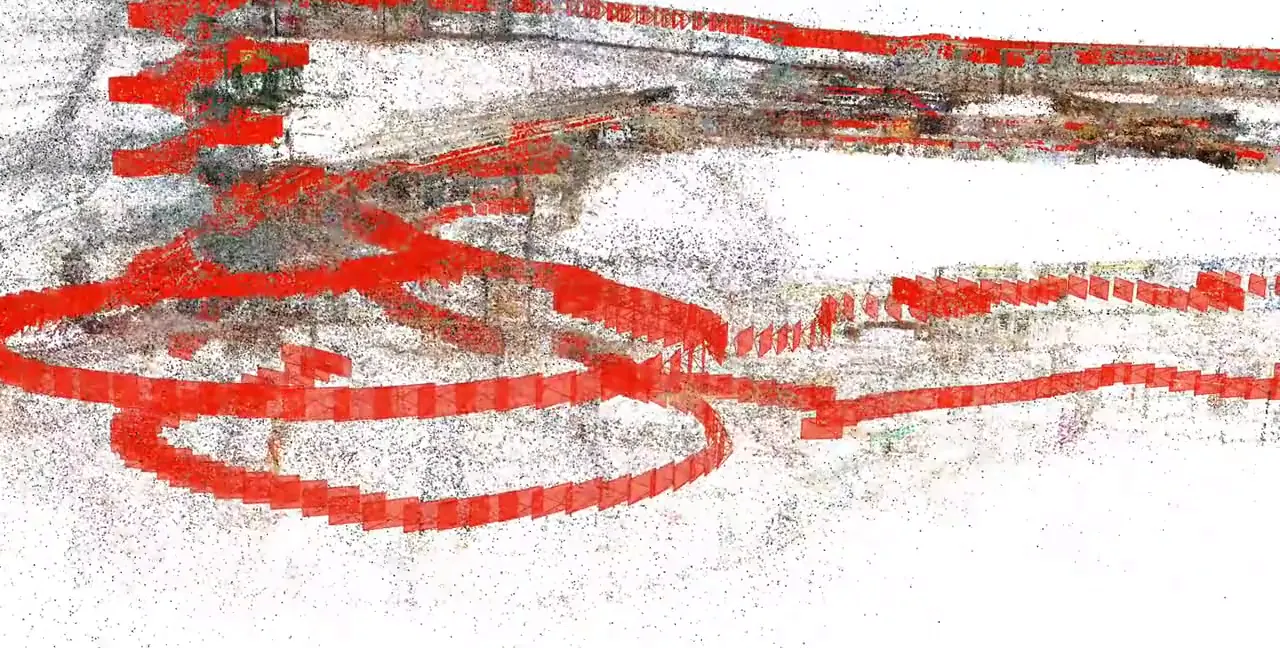
The OVER platform counts 270,000+ mapped locations, and OVER also works on a Large Geospatial Model. At Città Fiera in Udine, one operator captured 150,000 m² in 90 minutes with one 360° camera; the cover image shows the point cloud and camera poses from that capture.
We are onboarding the corporate and production site of a multinational industrial group. To see what a pilot could look like on your site, read about our 3D spatial data for robotics.